I want to batch download attachments of multiple records in a batch process
Answer
Please use the "Multiple Records Retrieval API" and "Attachment Retrieval API".
Overview
If you want to download attachments attached to multiple records in a table in batch processing, use the "Multiple Records Retrieval API" and "Attachment Retrieval API". This page introduces batch processing in PowerShell.
Limitations
- Only one table can be specified.
- Only one attachment column can be retrieved.
Operation Procedure
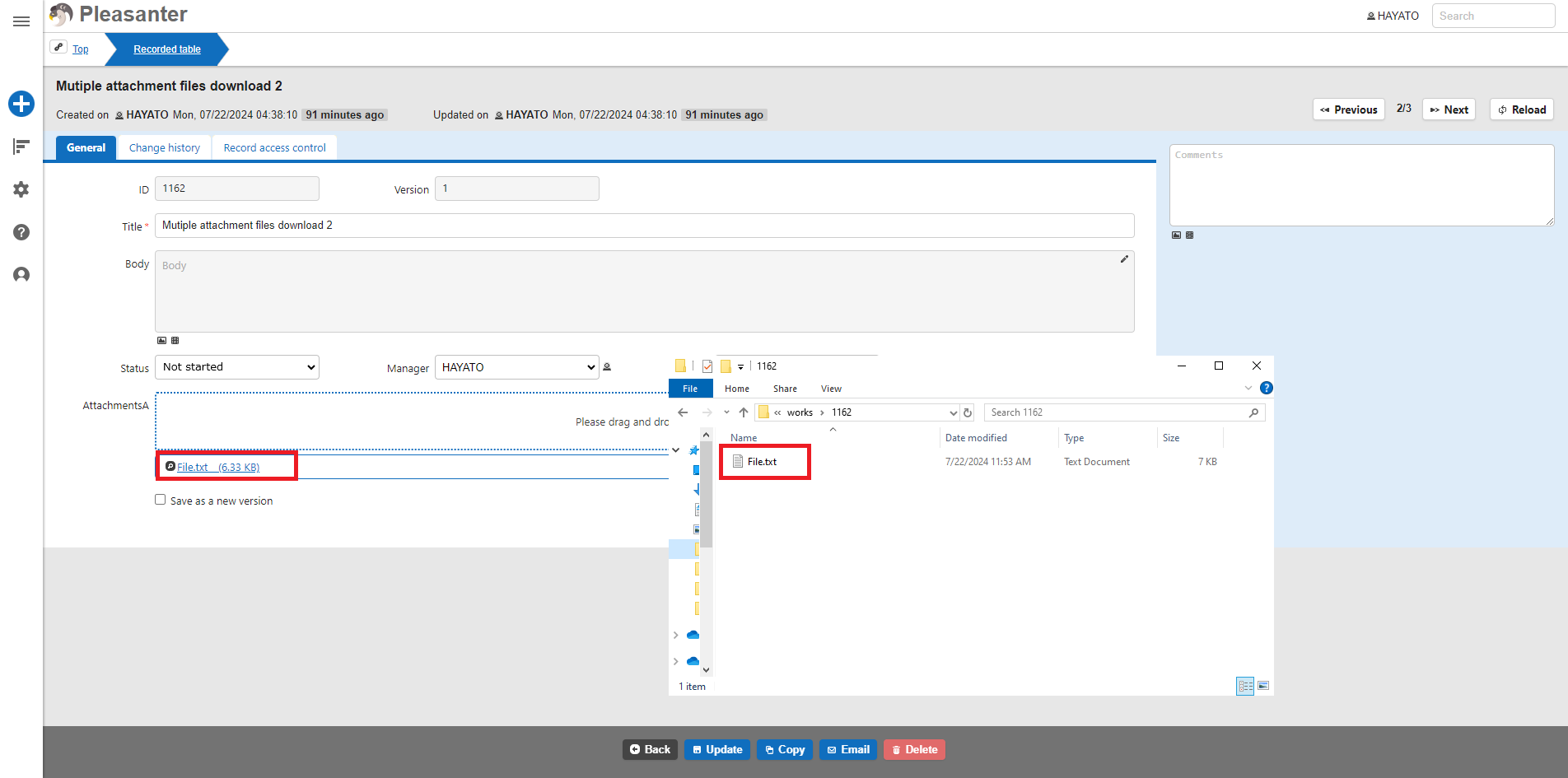
- Create a table and attach a file to the record.
- Open Windows PowerShell and write the following script. Modify the "Variable Definition" according to your environment.
- Execute the PowerShell script you created.
Execution Result
A folder with the record ID is created in C:Works, and the file attached to the AttachmentsA column is downloaded under it.

Code Samples
PowerShell
<#
*****************************
Variable definition location
User must change
*****************************
#>

# Download path (specify as "C:\work")
$toPath = '****'
# On Pleasanter (specify as protocol + domain "https://pleasanter.net/fs")
$baseUri = '****'
# API key
$apiKey = '****'
# Site ID of table
$siteId = '9999'
# Initialize offset
$offSet = 0
# Set ApiVersion
$apiVersion = 9999
# Set method
$method = '****'
# Set ContentType
$contentType = '****'
# Select attachment column to get
$attachmentItem = '****'

<#
*****************************
Logic definition part
No changes required by users
*****************************
#>
try {
# File download process
do {
  # JSON contents
    $jsonData = @{
        'ApiVersion' = $apiVersion
        'ApiKey' = $apiKey
        'Offset' = $offSet
    }
    # Convert to text format
    $json = $jsonData|ConvertTo-Json
    # Set URI
    $itemUri = $baseUri + '/api/items/' + $siteId + '/get'
    # Access a web page and assign the response
    $responseData = Invoke-WebRequest -Uri $itemUri -ContentType $contentType -Method $method -Body $json
    # Assign the information used in the process up to one level
    $response = ($responseData.Content|ConvertFrom-Json).Response
    # Assign the number of records that can be held per page
    $pageSize = $response.PageSize
    # Assign the total number of records recorded in the table
    $totalCount = $response.TotalCount
    # Assign record information
    $records = $response.Data
    # Iterating through records
    foreach ($record in $records) {
        # Assign the record's ResultId
        $id = $record.ResultId
        # Assign download destination folder path
        $folderPath = $toPath + '\' + $id
        # If the folder does not exist, continue processing
        if (-not(Test-Path $folderPath)) {
            # Create a download folder
            New-Item -Path $folderPath -Type Directory
        # If the folder exists
        } else {
            write-host 'Folder exists'
        }
        # Assign the contents of the response's AttachmentsHash
        $recordLinks = $record.AttachmentsHash
        # Iterating over data
        foreach ($recordLink in $recordLinks){
            # Assign the contents of AttachmentsA
            $attachments = $recordLink.$attachmentItem
            # Iterating over files
            foreach ($attachment in $attachments) {
                # Assign file name
                $name = $attachment.Name
                # Assign Guid
                $guId = $attachment.Guid
                # If the file exists in the download source, continue processing.
                if (-not($name -eq $null)) {
                    # Assign the download source path based on the GUID
                    $uri = $baseUri + '/api/binaries/' + $guId + '/get'
                    # Access a web page and assign the response
                    $responseData = Invoke-WebRequest -Uri $uri -ContentType $contentType -Method $method -Body $json
                    # Assign Base64 to each file
                    $base64 = ($responseData.Content|ConvertFrom-Json).Response.Base64
                    # Decode $base64
                    $byte = [System.Convert]::FromBase64String($base64)
                    # Assign output file name
                    $toFileName = $toPath + '\' + $id + '\' + $name
                    # Continue if file does not exist
                    if (-not(Test-Path $toFileName)) {
                        # Create a file in the download destination
                        New-Item -Path $folderPath -Name $name -Type File
                        # Write $src to the destination file
                        [System.IO.File]::WriteAllBytes($folderPath + '\' + $name,$byte)
                    # If the file exists
                    } else {
                       Write-Host 'File exists'
                    }
                }
            }
        }
    }
    $offSet = $offSet + $pageSize
} while ($totalCount -ge $offSet)
write-host 'Download completed'
} catch {
    $_.Exception.Response
}