Extended Start Guide
Overview
This is an extension for adding content to and removing content from the start guide.
Cautions
- When you change parameters, check Confirmation When Changing Parameters.
Limitations
- After you update the JSON file of the extended start guide, it is not reflected until you "restart Pleasanter".
- Place the images used in the start guide in the Implem.Pleasanter\wwwroot\images folder.
- You cannot omit the extension of an image file name.
How to Configure It
Create a JSON file with the following content under .\Pleasanter\App_Data\Parameters\ExtendedStartGuides and "restart the application". The extension of the JSON file must be json.
You can organise the files under ExtendedStartGuides into folders. In that case, all the JSON files under the ExtendedStartGuides folder are read as configuration files.
Parameter List
The parameters specified in the JSON file are as follows.
Parameter list
| Parameter Name | Configuration Example | Description |
|---|---|---|
| Description | "This extended start guide displays ..." | The description of the extended start guide. It does not affect the behaviour. |
| Disabled | false | When true, the settings of the extended start guide are disabled. |
| DeptIdList | [1,2,3] | Specifies the target department IDs in array format. This parameter can be omitted. |
| GroupIdList | [1,2,3] | Specifies the target group IDs in array format. This parameter can be omitted. |
| UserIdList | [1,2,3] | Specifies the target user IDs in array format. This parameter can be omitted. |
| TargetId | "SgManual" | Specifies the ID of the target of the operation specified by Action. For the target ID, refer to "id attribute values that can be specified as TargetId". |
| Action | "Append" | See the explanation of the Action parameter below. |
| StartGuides | [{...},{...},{...}] | See the explanation of the StartGuides parameter below. |
id attribute values that can be specified as TargetId
| Function guide User manual | Practical guide Application building guide | Promoting use Useful content | Function extension Enterprise edition | Reliable operation Problem-solving support |
|---|---|---|---|---|
| SgManual | SgGoHandsOn | SgMaterials | SgExtensions | SgSupport |
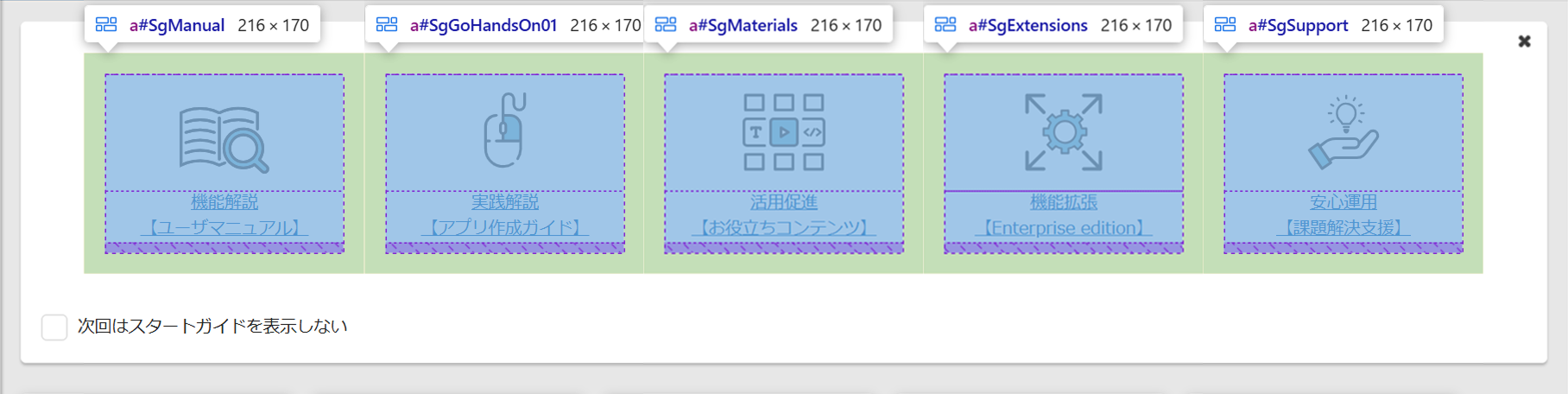
Action parameter
Specifies operations such as adding and removing a start guide, in the same format as the Enhanced Navigation Menu.
| Value | Description |
|---|---|
| Append | Adds a start guide after the start guide with the ID specified by TargetId. |
| Prepend | Adds a start guide before the start guide with the ID specified by TargetId. |
| Remove | Removes the start guide with the ID specified by TargetId. |
| Replace | Replaces the start guide with the ID specified by TargetId. |
| ReplaceAll | Replaces all the start guides. |
StartGuides parameter
Specifies the definition of the start guide to extend.
| Parameter Name | Configuration Example | Description |
|---|---|---|
| Id | "SgStartGuide" | Cannot be changed (it represents the value of the id attribute of the start guide) |
| Text | "Help is here" | Specifies the link text. |
| Url | "https://pleasanter.net" | Specifies the URL of the link destination. |
| ImgNameLight | "image.svg" | Specifies the file name of the image displayed together with the link text. This image is used when the theme is other than "midnight". *1 |
| ImgNameDark | "image-d.svg" | Specifies the file name of the image displayed together with the link text. This image is used when the theme is "midnight". 1 2 |
| Target | _blank | Specifies the target attribute used when the start guide is clicked. In this example, the destination screen is displayed in a separate tab. |
| Disabled | true | Disables the start guide. |
1 Specify the file name including the extension.
2 When it is omitted, the same image as ImgNameLight is displayed.
Code Samples
JSON (Append operation)
{
    "Disabled": "false",
    "TargetId": "SgExtensions",
    "Action": "Append",
    "StartGuides": [
        {
            "Id": "sg-01-append",
            "Text": "Test guide 01",
            "Url": "https://pleasanter.net/",
            "ImgNameLight": "hayato2.png",
            "ImgNameDark": "hayato3.png",
            "Target": "_blank",
            "Disabled": "false"
        },
        {
            "Id": "sg-02-append",
            "Text": "Test guide 02",
            "Url": "https://pleasanter.org/en/manual",
            "ImgNameLight": "hayato1.png",
            "ImgNameDark": "",
            "Target": "_blank",
            "Disabled": "false"
        },
        {
            "Id": "sg-03-append",
            "Text": "Test guide 03",
            "Url": "https://implem.co.jp/",
            "ImgNameLight": "",
            "ImgNameDark": "",
            "Target": "_blank",
            "Disabled": "false"
        },
        {
            "Id": "sg-04-append",
            "Text": "Test guide 04",
            "Url": "https://pleasanter.org/",
            "ImgNameLight": "",
            "ImgNameDark": "",
            "Target": "_blank",
            "Disabled": "true"
        }
    ]
}