File Export Sample
This is sample code that exports the data of a table to any folder.
The processing image is as follows.
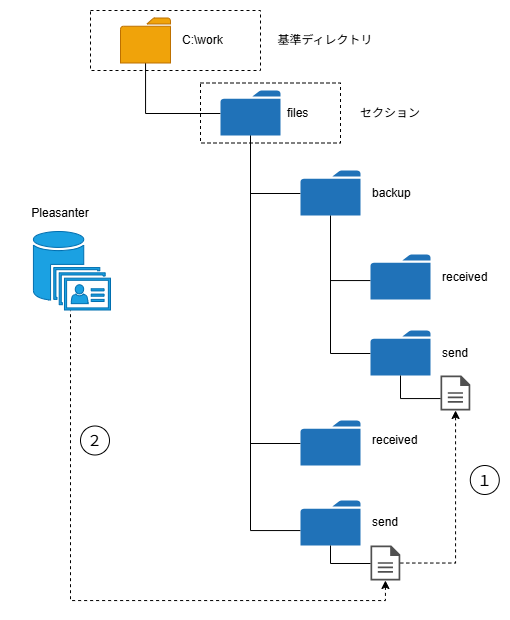
(1) Move the CSV files exported last time from the "send" folder to "backup/send"
(2) Store the exported CSV file in the "send" folder
JavaScript
// Various settings
const SECTION = 'files';
const SEND = 'send';
const BACKUP_SEND = 'backup/send';
const SITE_NAME = '[Site Name]';
const FILE_DATE_FORMAT = 'utilities';
// Get the string of the processing date and time
function getDateTimeString() {
    return new Date()
        .toLocaleString('ja-JP', {
            year: 'numeric',
            month: '2-digit',
            day: '2-digit',
            hour: '2-digit',
            minute: '2-digit',
            second: '2-digit',
            hour12: false, // 24-hour display
        })
        .replaceAll('/', '')
        .replaceAll(':', '')
        .replaceAll(' ', '');
}
// Get the site information
const site = items.GetClosestSite(SITE_NAME);
if (!site) {
    logs.LogException(`Site: ${SITE_NAME} was not found.`);
    return false;
}
const siteId = site.SiteId;
// Move the files in the send folder to the backup folder
const lists = $ps.file.getFileList(SECTION, SEND);
if (lists.length > 0) {
    for (const element of lists) {
        const moveResult = $ps.file.moveFile(
            SECTION,
            `${SEND}/${element}`,
            `${BACKUP_SEND}/${element}`,
        );
        if (!moveResult) {
            logs.LogException(`Failed to move the file. File name: ${element}`);
            return false;
        } else {
            logs.LogInfo(`Moved the file successfully. File name: ${element}`);
        }
    }
}
// File export: uses export definition ID 1. The target records are the records whose target month is this year
const param = {
    ExportId: 1,
    View: {
        ColumnFilterHash: {
            DateA: '["ThisYear"]',
        },
    },
};
const path = `${SEND}/${FILE_DATE_FORMAT}${getDateTimeString()}.csv`;
const exportResult = $ps.file.export(
    SECTION,
    path,
    siteId,
    $ps.JSON.stringify(param),
);
if (!exportResult) {
    logs.LogException(`Export failed. File name: ${path}`);
    return false;
} else {
    logs.LogInfo(`Export succeeded. File name: ${path}`);
}