Migrate Site Settings
Overview
Migrate site information, such as from a development environment to a production environment. Migrations are possible within the same server, between different servers, and between different DBMSs. Site IDs, User IDs, Department IDs, and Group IDs are converted during migration.
Limitations
- Records, attachments, images, etc. cannot be migrated.
- Departments, Groups, and Users cannot be migrated. Access rights associated with Departments, Groups, and Users can be migrated.
- The "Disable Cross-Search" checkbox setting cannot be migrated.
Operation Procedure
- Open "Settings.json" in Editor.
- Add the destination environment to Environments. Set the Name / Title / Dbms / ConnectionString.
- Specify the name of the destination environment in the DestinationName of the source environment.
- Set the SiteId / DestinationId / Subtree of the source target site in TargetSites.
- Launch Implem.PleasanterManagementStudio.exe.
- Click to select the target environment from the list of environments.
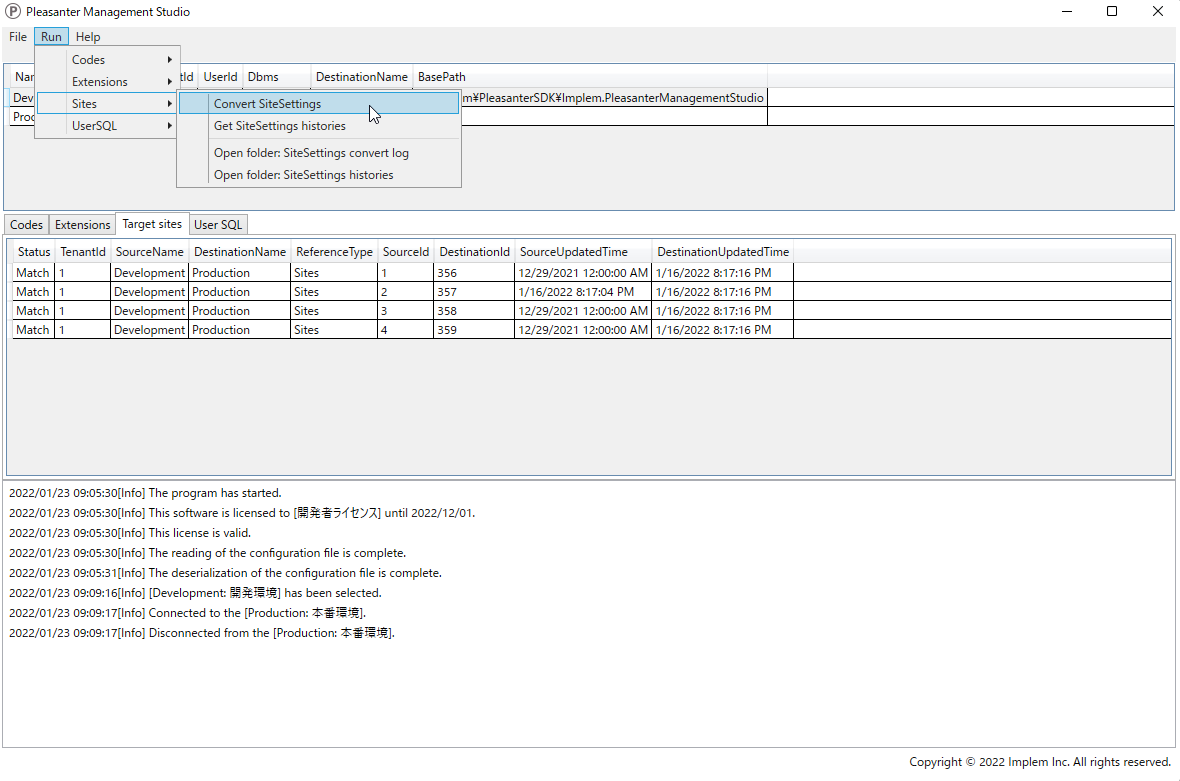
- From the menu at the top of the screen, click [Run] - [Sites] - [Convert SiteSettings].
- Check the confirmation items in the dialog and click "Yes".
- From the menu at the top of the screen, click [File] - [Open log folder] to open the log folder.
- Open the [SiteSettingsConvertLog] folder in the log folder to check the site settings before and after migration. You can also open this folder by clicking [Sites] - [Open folder: SiteSettings convert log] from the menu at the top of the screen.
Related Information