Retrieve source code from the Extensions table
Overview
Retrieves source code and JSON configuration data for Extension scripts, Server scripts, SQL extensions, and CSS extensions from the Pleasanter Extensions table.
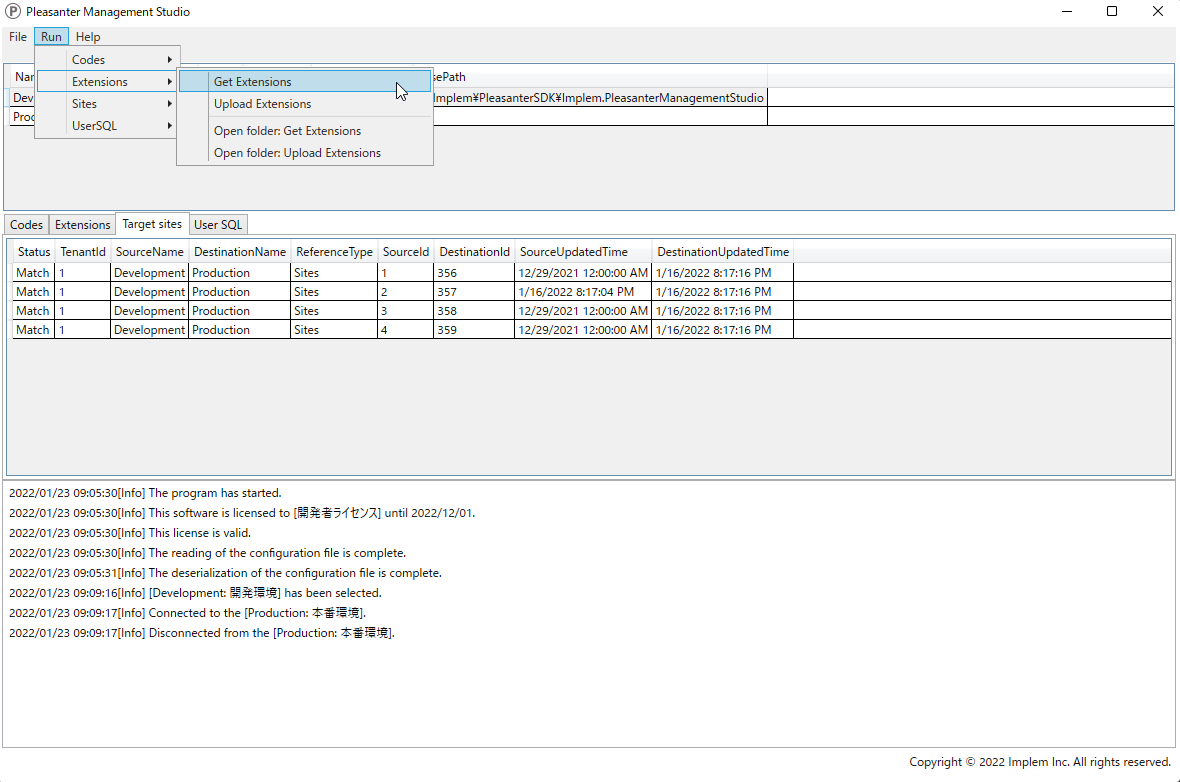
Operation Procedure
- Open "Settings.json" in Editor.
- Add the environment to be retrieved to Environments. Set the Name / Title / Dbms / ConnectionString.
- Specify the upper directory path where the source code is stored in BasePath.
- Specify the ExtensionId / ExtensionName / ExtensionType / Path in Extensions.
- Launch Implem.PleasanterManagementStudio.exe.
- Click the target environment from the list of environments to select it.
- Click [Run] - [Extensions] - [Get Extensions] from the menu at the top of the screen.
- Check the confirmation message in the dialog box and click "Yes".
- Click [File] - [Open log folder] from the menu at the top of the screen to open the log folder.
- Open the [GetExtensions] folder in the log folder to view the source code before and after the changes. You can also open the same folder by clicking [Extensions] - [Open folder: Get Extensions] from the menu at the top of the screen.