Function Overview
Overview
This software provides Pleasanter operators with functions for checking the usage, the performance, the permission list and so on, for setting monitoring alerts, and for requesting the deletion of unused sites. Each function is set up as an extension DLL of Pleasanter and works when you access the specified URL.
https://github.com/Implem/Implem.OperationsTools
Version
1.4.0
Operating Environment
This software runs in the environments below. Once the setup of Pleasanter is complete, it works simply by setting up the extension DLL of Operations Tools in the Pleasanter runtime environment. For the setup steps, refer to the following page.
Environments it has been checked in
- Windows environment: Windows 11 / SQL Server 2022 (.NET 10.0)
- Linux environment: Ubuntu 22.04 / PostgreSQL 18 (.NET 10.0)
- Azure environment: App Service / SQL Database (.NET 10.0)
- Docker environment (.NET 10.0)
Related Information
FAQ: I want to know the operating environment and recommended specifications of Pleasanter
Limitations
- This software works as an extension DLL of Pleasanter. It cannot be used in the Pleasanter.net environment.
-
On some screens, this software extracts the information it needs from tables such as the SysLogs table, in which the system log of Pleasanter is recorded, and displays it on the screen. If the specifications of the operating environment are low, it may not perform as you expect. (From ver.1.1.0, the displayed data is held in an intermediate table, which improves the performance.)
Note
For reference, the performance was checked in the following environments.
- Linux environment: about 3.7 million rows in the SysLogs table, CPU: 4 vCPUs, memory: 32 GB
- Azure environment: about 3.7 million rows in the SysLogs table, SQL Database: 200 DTU
-
If you do not use the System Log Extended Function, some information, such as that related to the API, cannot be seen.
Prerequisites
-
To use this software, one of the following conditions needs to be met.
- Enterprise Edition1 is applied to the Pleasanter of the environment you use
- The Pleasanter Extensions Trial is in progress in the environment you use
-
This software runs with Pleasanter ver.1.5.0.0 and later. If you use a version earlier than Pleasanter ver.1.5.0.0, upgrade Pleasanter.
List of Functions
This software provides the functions below.
Operation report
| Function Name | Overview |
|---|---|
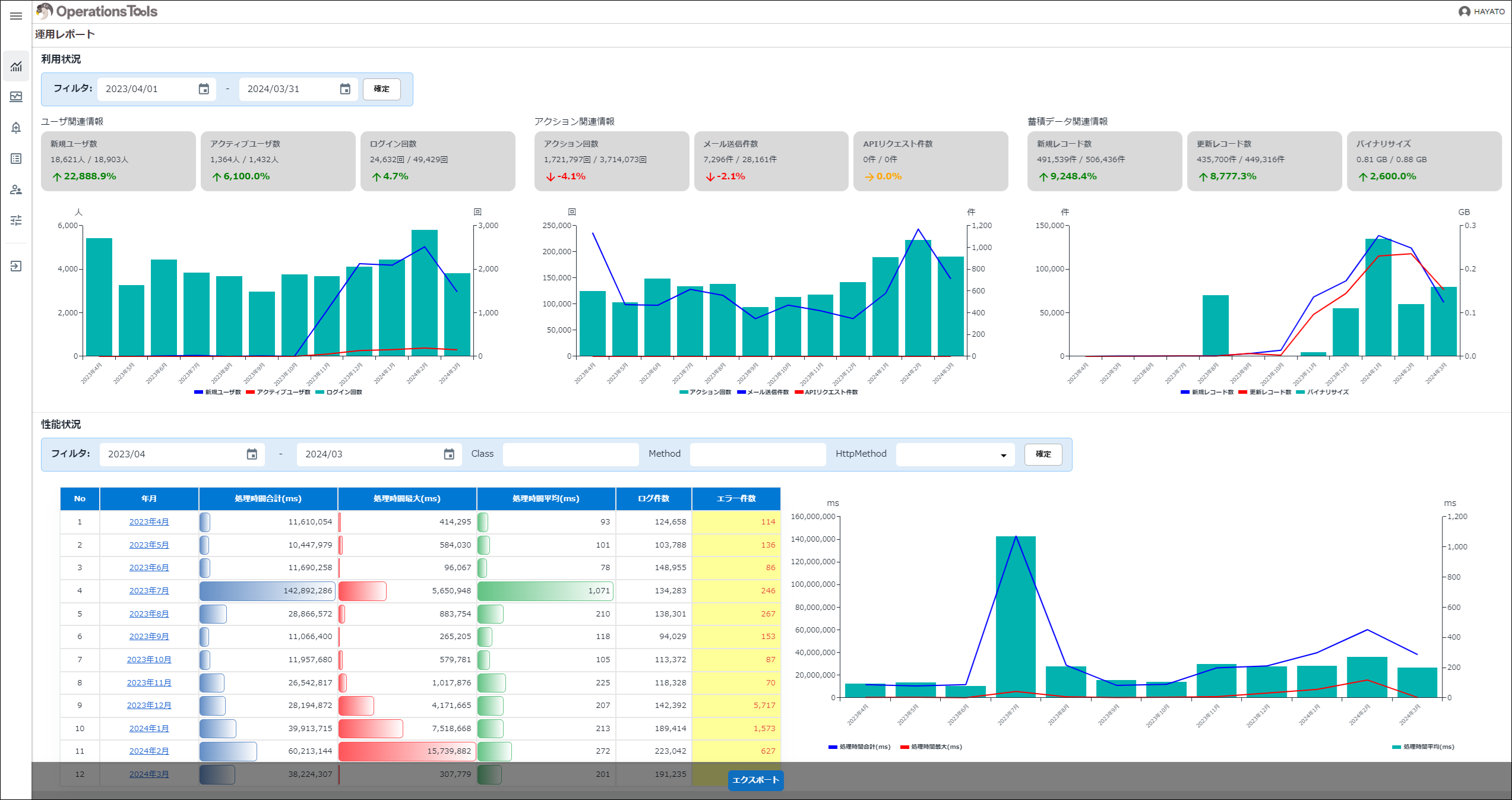
| Operation Report: Overall (usage / performance) | Check the overall usage and performance of Pleasanter |
| Operation Report: Performance: By Day | Check the performance of Pleasanter by day |
| Operation Report: Performance: By Hour | Check the performance of Pleasanter by time (in 15-minute units) |
Usage details
These screens let you check the usage details of Pleasanter. You can select "By Month", "By Day" and "Details".
| Function Name | Overview |
|---|---|
| Usage Details: By Month | Check the usage details of Pleasanter by month |
| Usage Details: By Day | Check the usage details of Pleasanter by day |
| Usage Details: Login History | Check the login history as usage details of Pleasanter |
| Usage Details: Mail Sending History | Check the mail sending history as usage details of Pleasanter |
| Usage Details: API Request History | Check the API request history as usage details of Pleasanter |
Monitoring
These screens let you check the current values and set the alert thresholds for the monitoring of Pleasanter, per "database", "system table" and "site". You can also check the detail information of the system tables and the sites.
| Function Name | Overview |
|---|---|
| Monitoring: Alert Settings | You can set the alert thresholds by entering the thresholds for "database", "system table" and "site" and clicking the update button |
| Monitoring: System Tables | The detail information of the system tables can be filtered by specifying a "system table name" |
| Monitoring: Sites | The detail information of the sites can be filtered by specifying a "site name" |
Site information list
| Function Name | Overview |
|---|---|
| Site Information List | Check the list of Pleasanter site information |
Permission list
| Function Name | Overview |
|---|---|
| Permission List | Check the list of permissions for Pleasanter sites |
Parameter list
| Function Name | Overview |
|---|---|
| Parameter List | Check the list of Pleasanter parameters and whether their setting values have been changed |
Common functions
| Function Name | Overview |
|---|---|
| Common Function: Side Menu | The explanation of the side menu |
| Common Function: Export | The explanation of the export |

Related Information
Operations Tools
- Setup
- Operation Report: Overall (Usage / Performance)
- Operation Report: Performance: By Day
- Operation Report: Performance: By Hour
- Usage Details: By Month
- Usage Details: By Day
- Usage Details: Login History
- Usage Details: Mail Sending History
- Usage Details: API Request History
- Monitoring: Alert Settings
- Monitoring: System Tables
- Monitoring: Sites
- Site Information List
- Permission List
- Parameter List
- Common Function: Side Menu
- Common Function: Export
- System Log Extended Function
- Pleasanter Extensions Trial
-
For Enterprise Edition, refer to the service specification of the "Pleasanter Annual Support Service". Depending on the support plan you apply for, applying Enterprise Edition can put a limit on the number of Pleasanter users. ↩